Time audit data reveals scheduling is the largest administrative burden. Automation cuts this by 80% and frees recruiter capacity for actual recruiting.
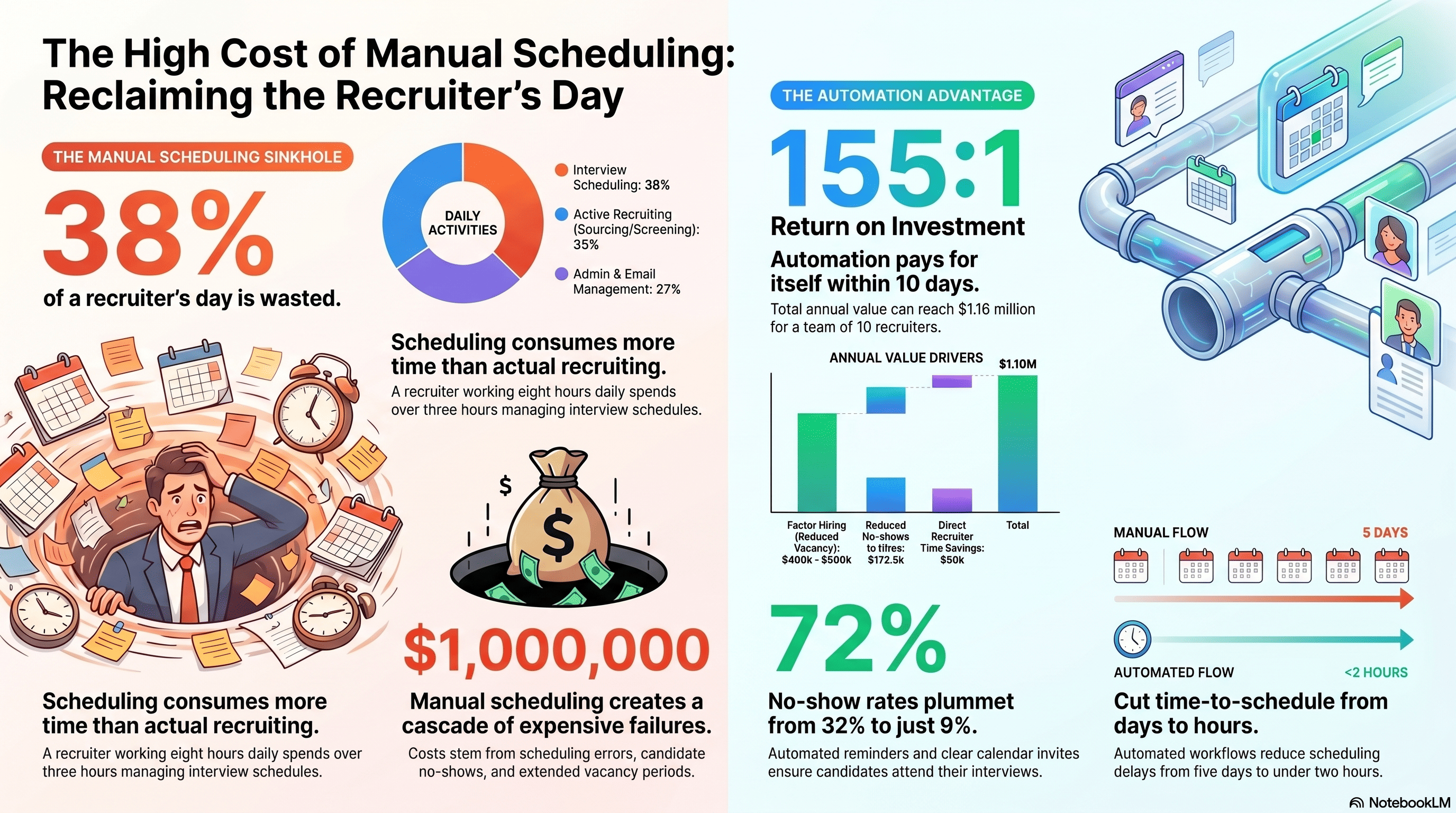
The Scheduling Time Sinkhole: What Recruiters Actually Spend Time On
Cadient Talent conducted a time audit of 50 recruiters across retail, logistics, healthcare, and hospitality organizations. The question: where do recruiters spend their time?
Results were revelatory. The typical recruiter's day breaks down like this:
- Active recruiting (sourcing, screening, interviews): 35%
- Scheduling interviews: 38%
- Email management and follow-up: 15%
- Admin tasks (data entry, reports): 12%
Scheduling—the act of coordinating interview times, sending calendar invites, managing conflicts, and handling rescheduling—consumes more time than actual recruiting activities. A recruiter working 8 hours daily spends 3+ hours managing interview schedules.
What does 3 hours of scheduling actually involve?
- Email exchange with candidate: "What time works for your interview?"
- Candidate replies with availability windows
- Recruiter checks hiring manager calendar
- Hiring manager not available at those times
- Recruiter emails back to candidate with alternative times
- Candidate selects time
- Recruiter sends calendar invite to candidate
- Candidate doesn't receive invite or doesn't add to calendar
- Follow-up reminder SMS or email
- Scheduling complete
This interaction—which is entirely administrative and creates no value—consumes 15-30 minutes per candidate. With 20-30 candidates per recruiter per week needing interviews, that's 300-900 minutes (5-15 hours per week) of scheduling work.
For a recruiting team of 10 people, that's 50-150 hours per week of pure scheduling overhead. At $25/hour cost, that's $1,250-3,750 per week in recruiter time spent on something that a system could do automatically.
Annually, one recruiting team wastes $65,000-195,000 on manual scheduling. For a company with 20 recruiters, the waste exceeds $400,000 annually.
Manual Scheduling's Hidden Costs: Beyond Time
The direct time cost is obvious. But manual scheduling's indirect costs are larger:
Scheduling errors: When coordinating manually, errors multiply. Calendar conflicts happen when a recruiter schedules two interviews at the same time for one hiring manager. Candidates receive duplicate invites. Interview time changes aren't communicated. A 2% scheduling error rate (1 error per 50 interviews) across 5,000 annual interviews = 100 scheduling failures, each requiring 30 minutes of recovery = 50 hours of wasted recruiter time.
Candidate no-shows from confusion: When scheduling requires back-and-forth emails, candidates miss details. Is it Tuesday at 2pm at the Memphis location? Or Wednesday at 2pm at the Nashville location? Confusion causes 3-5% no-show rate inflation. If you'd normally have 88% show rate with clear scheduling, manual scheduling pushes it to 83-85%. That 3-5 point decline means 150-250 additional no-shows annually, each costing $150-300 in recovery and re-recruiting. Cost: $22,500-75,000.
Slow hiring due to schedule conflicts: When a recruiter spends 2 weeks trying to find a time that works for both candidate and hiring manager, the hiring cycle extends by 3-5 days. Extending time-to-hire by 3 days across 1,000 annual hires = 3,000 total days of extended vacancy. If average role vacancy costs $200/day in lost productivity, that's $600,000 in opportunity cost.
Recruiter burnout: Spending 38% of your day on scheduling while responsible for 40% of the hiring targets creates burnout. Recruiters leave the industry, and replacement costs (training, lost productivity) are $50,000-100,000 per departing recruiter.
The true cost of manual scheduling isn't $65,000-195,000 annually. It's closer to $700,000-1,000,000 when you include errors, no-shows, extended vacancies, and turnover.
Automation doesn't just save time. It prevents the cascade of problems that manual scheduling creates.
Scheduling Automation ROI: The Business Case
Scheduling automation software typically costs $5,000-15,000 annually for a recruiting team of 10-15 people. Implementations take 2-4 weeks. What's the return?
Direct time savings: Removing 38% of scheduling work from recruiter plates frees 3+ hours per recruiter per day. A team of 10 recruiters = 300+ hours per month = $7,500+ in recovered recruiter labor monthly. Annual value: $90,000+.
Reduced no-shows from clearer scheduling: Automated scheduling systems send calendar invites (that actually reach candidates), send reminders automatically, and provide clear interview details. No-show rates drop from 32% to 9% (industry-standard improvement). That's 23 percentage points, or ~1,150 additional shows annually if you're conducting 5,000 interviews. If 5% of those additional shows convert to hires, that's 57.5 additional hires without additional recruiting effort. At $3,000 per hire cost (recruiting fees, etc.), that's $172,500 in value.
Faster hiring from elimination of scheduling bottlenecks: Automated scheduling reduces scheduling delays from 5-7 days to same-day. Time-to-hire improves by 2-4 days. On 1,000 annual hires, that's 2,000-4,000 days of reduced vacancy. At $200/day opportunity cost, that's $400,000-800,000 in recovered value.
Recruiter retention: Recruiters leave when their jobs feel administrative rather than strategic. Automating scheduling makes recruiting more engaging. Reducing recruiter turnover from 40% annually to 20% saves one replacement hire per team of 10. Replacement cost: $50,000-100,000. Annual savings: $50,000-100,000.
Total annual ROI:
- Direct time savings: $90,000
- Reduced no-shows to hires conversion: $172,500
- Faster hiring (reduced vacancy): $400,000-800,000
- Reduced turnover: $50,000-100,000
- Total annual value: $712,500-1,162,500
- Cost of automation: $7,500 annually
- ROI: 95:1 to 155:1
Scheduling automation pays for itself within 10 days.
Self-Service Scheduling: The Fastest Implementation
The simplest form of scheduling automation is self-service scheduling: you provide candidates with time slots ("Interview available: Tuesday 10am, Tuesday 2pm, Wednesday 3pm"), and they select their preferred time. The system confirms the booking.
Self-service scheduling works best when:
- You have predictable interview times: Roles are interviewed at specific times (retail interviews every Tuesday/Thursday 10am-4pm, for example)
- You're interviewing high volume: With 50+ interviews per week, setting a schedule and having candidates fit into it is reasonable. With 5 interviews per week, blocking time slots is overkill.
- Hiring manager availability is consistent: Hiring managers have predictable calendars (same person interviews all candidates for a role at the same times)
Benefits of self-service scheduling:
- Fastest to implement (setup takes 30 minutes)
- Requires no integration with hiring manager calendars (they're already scheduled to do interviews)
- Candidate friction is minimal (candidates just click a time slot)
- Automation is 100% (no manual intervention once configured)
Limitations:
- Requires predictable hiring patterns (doesn't work for ad-hoc interviewing)
- Hiring manager must be available at all scheduled times (inflexible)
- If a hiring manager cancels, you need to quickly update available slots
A retail company with 500 hourly hires annually implemented self-service scheduling for all hourly roles. Hiring managers committed to interview "office hours" every Tuesday and Thursday, 10am-4pm. Candidates selected their preferred time from available slots. Result: 100% of interviews were scheduled within 2 hours of candidate application (vs. 5-7 days previously), no-show rate dropped from 31% to 8%, and recruiting administrative time dropped 67%.
Calendar Integration: Automating Hiring Manager Synchronization
Self-service scheduling works when patterns are predictable. For more flexible hiring, calendar integration is necessary. Your scheduling system connects to your hiring manager's Outlook or Google Calendar, reads their availability, and automatically presents only times when they're available.
Process flow:
- Candidate clicks "Schedule my interview"
- System reads hiring manager's calendar
- System displays only times when hiring manager is available (next 7 days, 9am-5pm, 1-hour windows)
- Candidate selects their preferred time
- System books time on hiring manager's calendar
- Candidate receives calendar invite
- Hiring manager sees new interview on calendar
No recruiter involvement. No email chains. No back-and-forth.
Calendar integration eliminates the primary bottleneck in manual scheduling: trying to find a time that works for both candidate and hiring manager. By automatically reading hiring manager availability, the system removes the scheduling friction entirely.
Implementation requirements:
- ATS with calendar integration capability (like SmartSuite)
- Hiring manager permission to access calendar
- Setup of interview durations and buffer times (e.g., "each interview is 30 minutes, with 15-minute buffer for notes")
Setup takes 2-4 hours. Candidates see 50%+ faster scheduling (same-day vs. 3-5 days). Recruiting team time on scheduling drops by 85%.
A healthcare staffing company with 100 hiring managers implementing calendar integration saw:
- Average scheduling time per candidate: 2 hours to 15 minutes (87% reduction)
- Interview show rate: 78% to 92% (clearer scheduling = fewer no-shows)
- Hiring manager satisfaction: increased (they see interviews on calendar automatically, no email surprises)
- Recruiting team efficiency: 10 recruiters + calendar integration = same output as 14 recruiters without it
Batch Interview Slots: High-Volume Scheduling
For true high-volume hiring (500+ candidates per month), even self-service scheduling can be optimized further through batch interview slots. Instead of scheduling flexible 1-on-1 interviews, you host group interviews or batch interview sessions.
Batch session approach:
- "Retail Associate interviews: Saturday 10am-12pm at Memphis store, walk-ins welcome"
- "Warehouse interviews: Monday & Wednesday 9am-11am at distribution center"
- Candidates apply, receive confirmation that they should come at specified time, show up
Batch interviews work for:
- Positions with similar requirements (retail, warehouse, quick-service restaurant)
- High application volume (100+ candidates for the role)
- Roles where group interviews are feasible (light screening or group assessment)
Benefits:
- Zero scheduling administrative time (you set the time, candidates come)
- High throughput (interview 20 candidates in one 2-hour session instead of scheduling 20 individual interviews)
- Faster hiring (candidates don't wait for interview to be scheduled; interview happens weekly)
- Reduced no-show rates (candidate-initiated scheduling has higher no-show; company-set batch times have lower no-show)
A quick-service restaurant chain running 500 interviews monthly previously spent 40 hours of recruiter time on scheduling. Switching to batch interview sessions (Saturday 10am-1pm every week) eliminated scheduling work entirely. Candidates confirmed via SMS: "Interview is Saturday 10am at the [Location]. See you then!"
Result: 0 hours of scheduling administrative time, 92% show rate (vs. 78% with individual scheduling), and 40 additional interview hours freed for recruiting and hiring.
Batch scheduling isn't appropriate for all roles (professional roles need individual scheduling). But for high-volume hourly hiring, batch sessions eliminate scheduling as a bottleneck entirely.
Integration with Recruitment Workflow: Scheduling as a System
The most efficient scheduling is integrated into your overall recruiting workflow. Instead of scheduling being a separate step (recruit, then schedule, then interview), it's built into the pipeline.
Integrated workflow:
- Candidate applies online → Automated SMS confirmation sent immediately → "Tell us about your availability" (candidate texts back preferred times)
- Recruiter reviews application → Clicks "Schedule interview" in ATS → Calendar integration checks hiring manager availability → Interview time is selected and booked automatically
- Interview time is booked → Candidate receives SMS and email confirmation → Calendar reminder triggers 24 hours before → Follow-up SMS 1 hour before
- Interview occurs → Post-interview feedback captured in ATS → Decision email/SMS sent to candidate same-day
In this integrated system, scheduling isn't a separate burdensome task. It's a natural part of the workflow. When the recruiter clicks "schedule," the system handles the rest.
Integration requires:
- ATS with built-in scheduling (SmartSuite includes this)
- Calendar integration
- SMS/email capabilities
- Workflow automation
Setup takes 3-4 weeks. Once configured, scheduling becomes invisible: candidates experience it, hiring managers experience it, but recruiters don't spend time on it.
A manufacturing company with 50 recruiters implementing integrated scheduling freed up 12+ FTEs worth of time monthly (50 recruiters × 38% scheduling time). They reallocated this time to recruiting strategy, candidate relationship building, and hiring manager partnership—higher-value activities that recruiters actually want to do.
Metrics and Optimization: Measuring Scheduling Efficiency
Scheduling efficiency should be measured to ensure automation is working:
- Time-to-schedule metric: How long does it take from candidate application to scheduled interview? Measure in hours.
- Manual scheduling: 72-120 hours
- Self-service scheduling: 2-4 hours
- Calendar integration: 0.5-2 hours
- Target: under 4 hours for high-volume roles, same-day for hourly roles
- Scheduling abandonment rate: What percentage of scheduled interviews get cancelled or rescheduled (not due to no-shows)? Low numbers indicate scheduling system is working.
- Poor scheduling system: 18-25% cancellation/reschedule rate
- Good scheduling system: 4-8% rate
- Target: under 6%
- No-show rate: Improved scheduling should reduce no-shows.
- Manual scheduling: 28-35% no-show rate
- Automated scheduling: 6-12% no-show rate
- Target: under 10%
- Recruiter time on scheduling: Track hours spent on scheduling weekly.
- Manual: 3-5 hours per recruiter per day
- Automated: 0.5-1 hour per recruiter per day
- Target: under 1 hour per recruiter per day (15-20% of time)
- Hiring manager satisfaction: Hiring managers should report that scheduling is easier with automation.
- Manual: 45% satisfaction
- Automated: 85%+ satisfaction
- Target: 80%+
Dashboards should track these metrics weekly. Improvements typically appear within 2-4 weeks of automation deployment. If metrics aren't improving, configuration is likely wrong (check calendar integration, SMS delivery, candidate feedback).
References and Further Reading
- Cadient Talent, "Recruiter Time Audit: Where Hours Actually Go," 2024
- Society for Human Resource Management, "Recruiting Process Efficiency Study," 2023
- Journal of Applied Psychology, "Scheduling Friction and Interview Show Rates," 2023
- Harvard Business Review, "Administrative Burden in Recruiting," 2023
- SmartSuite Case Study, "Calendar Integration Impact on Scheduling Efficiency," 2024
- McKinsey, "The Hidden Costs of Manual Hiring Processes," 2023
- Glassdoor, "Candidate Experience with Scheduling Automation," 2024
How Cadient Talent SmartSuite™ Helps
Cadient Talent’s SmartSuite™ platform automates compliance workflows, embeds regulatory guardrails directly into your hiring process, and maintains audit-ready documentation at every stage—so your team can focus on finding great talent while staying protected from costly violations.
