How application friction destroys your pipeline and how to optimize every element
The Application Abandonment Crisis
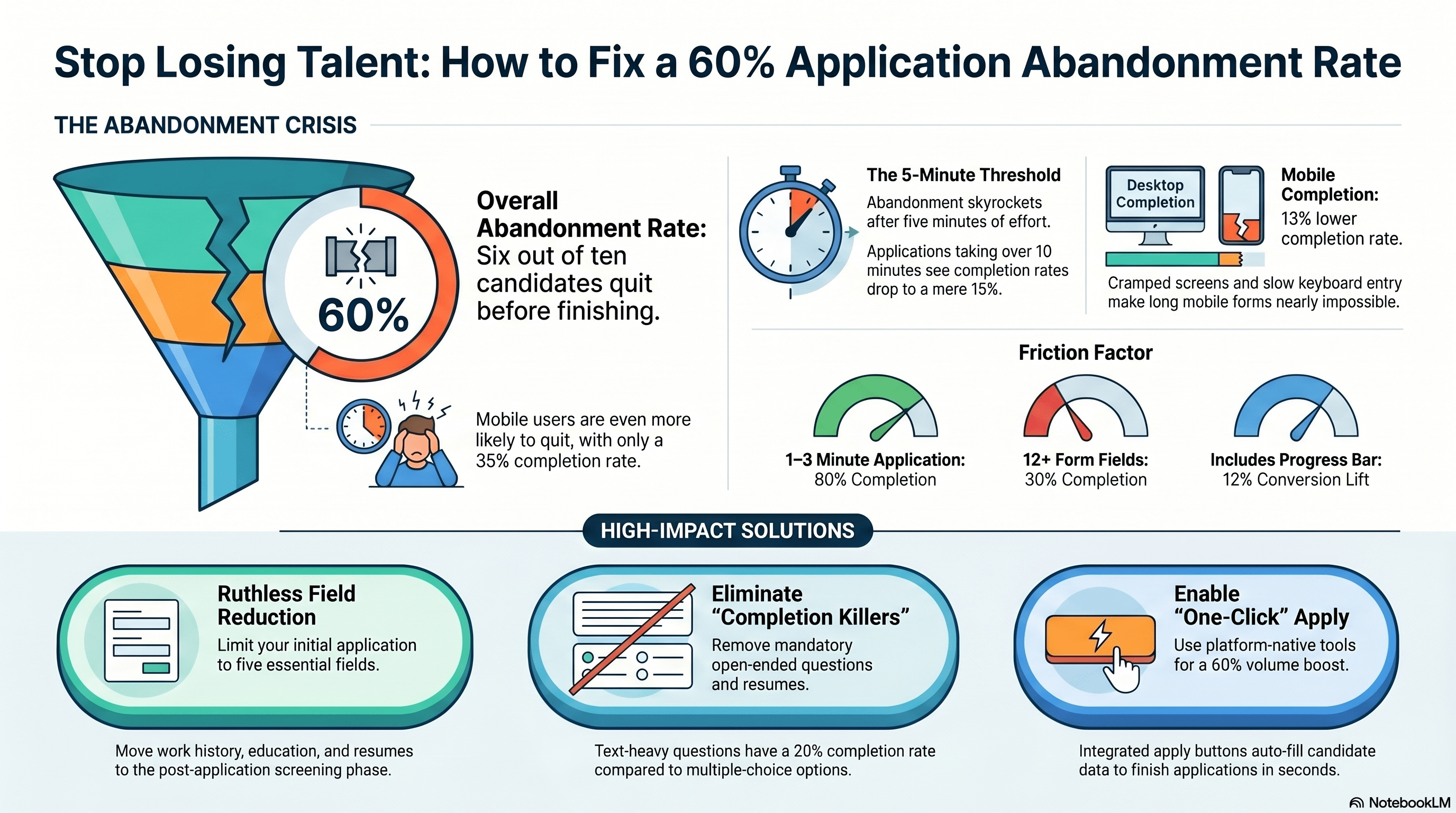
You've posted a job. You're getting applications. But 60% of candidates who click 'Apply' never actually submit the application.
They start, get frustrated, and leave.
This is the application abandonment rate, and it's catastrophic for high-volume hiring.
HubSpot analysis of 100,000+ applications across job platforms found:
- 40% of candidates who click 'Apply' complete the application
- 60% abandon it partway through
- On mobile: 35% completion rate (65% abandonment)
- On desktop: 48% completion rate (52% abandonment)
Why does this matter? Because abandonment directly reduces your pipeline size.
Example: You need 1,000 applications to hire 50 people (20-to-1 funnel). To get 1,000 completed applications, you'd need 1,667 people to click 'Apply' (40% completion rate). If you optimize your application process to 55% completion rate, you only need 1,818 clicks—a 9% reduction in traffic needed.
That's massive. Your sourcing burden drops 10-15% by just optimizing the application process. No additional job postings, no additional paid ads, no additional recruiting effort. Just a better application flow.
Let's talk about what causes abandonment and how to fix it.
The 5-Minute Threshold: The Deadline Before Dropout
Research from Indeed (2023) and Glassdoor (2023) both converged on a key finding: the 5-minute threshold.
Candidates are willing to spend up to 5 minutes on an application. Beyond that, abandonment rate skyrockets.
Data:
- 0-1 minute application: 90%+ completion
- 1-3 minute application: 80% completion
- 3-5 minute application: 60% completion
- 5-10 minute application: 35% completion
- 10+ minute application: 15% completion
What takes time in an application?
- Initial form fields (name, email, phone): 1 minute
- Address/location fields: 1 minute
- Work history/employment questions: 2-3 minutes
- Essay questions/open-ended responses: 3-5+ minutes
- Assessment/test: 5-15+ minutes
- File uploads (resume, cover letter): 1-2 minutes
- Final review and submission: 1 minute
A standard application with all of these takes 15-20 minutes. That's why your completion rate is 40%—you're asking for 3x the time candidates are willing to give.
The solution is radical: minimize the initial application to essentials only. Gather more information later, in the screening phase.
The Field-by-Field Dropout Rate: Every Question Costs You
Formstack research (2021) on web form abandonment found a critical pattern: every additional field reduces completion rate by 3-5%.
Applied to job applications:
- 3 fields (name, email, phone): 85% completion
- 5 fields (+ location, desired wage): 70% completion
- 8 fields (+ work history, availability): 50% completion
- 12 fields (+ education, skills, preferences): 30% completion
- 15+ fields: <15% completion
This is devastating. Most companies' applications have 12-18 required fields. That's why 60% of candidates abandon.
The fix: Ruthlessly cut fields. Ask only what you absolutely need upfront.
Minimal viable application:
- Full name
- Email
- Phone
- [If required] Driver's license (yes/no)
- [If required] Work authorization confirmation
That's it. 5 fields. 5 minutes max. 70%+ completion rate.
Every other question—education, work history, availability, salary expectation, open-ended questions—move to the screening phase. Ask them after they apply, via email or phone.
Why this works:
- Candidates aren't committed yet. You're asking for their attention cost (5 minutes) before asking for their commitment cost (full history, documents).
- You screen out unqualified candidates early (missing basic requirements), so your screening team isn't wasting time.
- Qualified candidates move fast, building momentum.
Objection: 'But we need this information to screen properly.'
Response: You do need it, but you don't need it upfront. Collect it in the screening phase after they've applied. Your application is a two-stage process: Apply (quick), then Screen (detailed).
Mobile Completion Crisis: Why Most Candidates Abandon on Phone
65% of job applications are started on mobile. But mobile completion rate is only 35%, vs. 48% on desktop.
Why the massive gap?
- Screen size: Forms that look fine on desktop are cramped on phone. Filling in name, email, and phone takes more taps, more scrolling.
- Keyboard entry: Mobile keyboard is slower than desktop typing. A 10-field form takes 3x longer on phone.
- Auto-fill inconsistency: On desktop, browsers auto-fill some fields. On mobile, inconsistency—some fields populate, some don't. Candidates have to fix manual entries.
- Progress anxiety: On mobile, it's hard to see how far through the form you are. Candidates feel like they're in an endless scroll of questions. On desktop, progress bars help.
- Network interruption: Mobile is more prone to connection drops. Form data gets lost. Candidate gives up.
Data from Indeed and Glassdoor:
- Mobile applications with progress bar: 42% completion (5-7 point lift)
- Mobile applications with auto-fill: 38% completion (3-point lift)
- Mobile applications optimized for small screens (larger buttons, reduced fields): 55% completion (20-point lift)
The fix: Optimize applications specifically for mobile.
Mobile optimization checklist:
- Responsive design: Form adapts to screen size. Test on iPhone and Android.
- Large touch targets: Buttons, input fields are big enough to tap accurately (minimum 44x44 px).
- Vertical layout: Stack fields vertically, not side-by-side. Easier to scroll.
- Progress indicator: 'Question 2 of 5' tells candidates they're almost done.
- Auto-fill support: Use standard HTML field names so browser auto-fill works.
- Save progress: If candidate closes the app, save their answers. Let them resume later.
- One field per screen (optional): Some apps show one question per screen, swipe to next. Feels faster, even if it's not.
- Mobile-first design: Build for phone first, then expand to desktop. Most optimization happens at mobile-first stage.
Result: Mobile applications optimized for small screens see 50-55% completion vs. 35% baseline. That's a 40-50% improvement.
Pre-Populated Fields and Smart Defaults: Effort Reduction
Every field a candidate has to manually fill out adds friction. Pre-population removes that friction.
Example:
- Candidate clicks 'Apply' from Indeed.
- Your ATS imports candidate's Indeed profile data (name, email, phone, resume).
- Your application form is pre-populated with this data.
- Candidate just has to confirm/correct a few things.
- Application is 50% faster.
How to implement:
- ATS integration with job boards: If you post on Indeed, LinkedIn, and Workable, set up API integrations so candidate data flows into your application form automatically.
- Smart defaults: If you know the candidate came from a specific source (Indeed mobile, Facebook ad), pre-fill fields:
- 'Position applied for' (auto-populated based on job they clicked)
- 'Location' (auto-populated based on which location they applied from)
- 'Referred by' (if they came through a referral link)
- Resume parsing: If candidate uploads a resume, parse it to auto-extract:
- Name
- Email
- Phone
- Work history (optional, can be confirmed)
Resume parsing tools (Affinity, Beamery, most modern ATS platforms) use OCR/AI to extract this in seconds.
Implementation effort: 5-10 hours for ATS team to set up integrations, then it's automated.
Impact: 10-20 minute applications become 3-5 minute applications. Completion rate improves 15-25 percentage points.
Open-Ended Questions: The Completion Killers
Open-ended questions are the death of application completion.
Examples of completion-killing questions:
- 'Tell us about yourself in 200+ words.'
- 'Why do you want to work here?'
- 'Describe a time you overcame a challenge.'
- 'What are your career goals?'
Formstack data: Open-ended questions (that require text entry) have a 15-20% completion rate. Candidates see them and think 'ugh, too much work' and abandon.
For hourly hiring, open-ended questions are especially damaging because:
- Hourly candidates have less time (many are working already)
- Many are less comfortable writing essays
- They see open-ended questions as 'too much effort for a cashier job'
The solution: Minimize open-ended questions upfront. Ask them later if the candidate advances.
Better approach:
Application: Multiple choice and short-answer only
- 'What shift works best for you?' (checkbox: morning, afternoon, evening, flexible)
- 'Earliest start date?' (date picker: today, next week, next month)
Screening call (if they advance):
- 'Tell me about yourself. What interests you in this job?'
- Open-ended conversation that feels natural, not like filling out a form.
Why this works:
- Candidates complete applications faster (multiple choice is 3x faster than typing)
- You still gather the information (through screening call)
- Screening call is actually better for assessing fit (conversation beats questionnaire)
If you must have open-ended questions, keep them:
- Optional (not required)
- Short-form (1-2 sentences, not essays)
- Later in the form (after you've built momentum)
File Uploads and Resume Requirements: The False Gate
Many applications require resume uploads. But most candidates applying to hourly roles don't have a polished resume. And file uploads add friction (finding file, uploading, waiting).
Data from Indeed:
- 'Resume required' applications: 40% completion
- 'Resume optional/encouraged' applications: 55% completion
- Applications without resume field: 65% completion
For hourly roles, resume is less critical. You care about: Can they work the hours? Do they have the legal status? Can they do the job? Their resume history is secondary.
Better approach:
- Make resume optional in the application: 'Attach resume (optional) if you have one.'
- If they're interested and advance to screening, ask for resume then. Many candidates will share it via email during screening.
- For roles where resume is truly critical (shift lead, management), you can require it, but know you'll get fewer applications.
Alternative: Ask for resume during screening, not during application.
Application: No resume field
Screening email: 'Thanks for applying! Before we schedule an interview, can you send over your resume? Takes 30 seconds.'
Result: More applications because application is faster. You still get resumes from candidates who advance.
The Progress Indicator: Psychological Momentum
A seemingly small element—showing candidates how far through the application they are—dramatically improves completion.
Research from Formstack and Nielsen:
- Applications without progress indicator: 40% completion
- Applications with progress bar: 52% completion (12-point lift)
- Applications with '5 of 10' text indicator: 48% completion (8-point lift)
Why? Psychological momentum. When candidates see 'Question 3 of 5,' they think 'almost done!' and keep going. Without a progress indicator, they feel lost in an endless form and quit.
Implementation: Every modern form builder (Typeform, Google Forms, ATS systems) supports progress indicators. It's a checkbox.
Best practices:
- Show progress bar at the top
- Also show 'Question X of Y' text below the progress bar
- Make the progress bar visible (not tiny)
- When they reach the end, show 'Final Step—Review and Submit'
This one element can improve completion rate by 10-15%. Low effort, high impact.
One-Click Apply: The Platform Solution
The ultimate solution for mobile application abandonment is 'one-click apply' or 'quick apply' offered by job platforms.
What it is: Candidate clicks 'Apply Now' on Indeed/LinkedIn/Facebook Jobs. The platform auto-fills name, email, phone, and resume from the candidate's profile. They just click 'Submit.' Done in 5 seconds.
Data:
- One-click apply completion rate: 65%+
- Traditional multi-field apply: 40%
- Lift from one-click: 60%+
How to enable:
- Indeed: Use Indeed's 'Apply Button' and ensure your ATS integrates with Indeed's API
- LinkedIn: Enable 'Easy Apply' on LinkedIn job postings
- Facebook Jobs: Enable one-click apply in Facebook Jobs settings
Trade-off: You lose some screening data upfront (address, etc.), but you get way more applications. You can ask for detailed information during screening.
Recommendation: Enable one-click apply on all platforms. This single decision improves your application funnel by 30-50%.
Streamlining Applications for Hourly Roles: The Template
Here's a streamlined application template optimized for hourly hiring:
Minimal Application (Mobile-First, 3-5 Minutes)
Page 1: Basic Info
- Full name (required)
- Email (required)
- Phone (required)
- [One field dependent on job: e.g., 'Do you have a valid driver's license?' (yes/no) if job requires it]
Page 2: Availability
- Preferred shift (radio buttons: Morning, Afternoon, Evening, Flexible)
- Earliest start date (date picker)
- Hours per week you can work (slider or buttons: 20-30, 30-40, 40+)
Page 3: Screening Questions (3 max)
- 'Why are you interested in this job?' (Optional, open-ended 1-2 sentences)
- 'What's your biggest strength for this role?' (Optional, open-ended 1-2 sentences)
- [Industry-specific] 'Have you worked in retail before?' (yes/no, or multiple choice)
Page 4: Legal
- Confirm work authorization (yes/no) [required if applying in US]
- Confirm willingness to work required shifts (yes/no) [required]
Page 5: Review & Submit
- Summary of answers
- Edit button (go back if needed)
- Submit button
Technical Requirements
- Mobile-responsive (test on iPhone and Android)
- Progress bar showing "Page 3 of 5"
- Save button after each page (allow resume later)
- Auto-save every 30 seconds
- Confirmation email immediately upon submission
Estimated completion time: 3-5 minutes
Expected completion rate: 60-70%
This is a radical simplification from typical applications, but it works for hourly hiring.
Measuring and Optimizing: The Funnel Analytics
To improve application completion, you need to measure it.
Metrics to track:
- Click-to-apply rate: How many people click 'Apply' per job posting
- Application start rate: Of those who click, how many start the form
- Application completion rate: Of those who start, how many submit
- Drop-off by field: Which field causes the most abandonment (use analytics)
Example monthly dashboard:
- Job postings: 12
- Total clicks to apply: 3,000
- Applications started: 2,800 (93% start rate)
- Applications completed: 1,120 (40% completion rate)
- Applications abandoned: 1,680 (60% abandon rate)
- Where candidates drop off most: Field 8 (work history)—50% of remaining candidates drop there
Conclusions:
- Start rate is good (93%)
- Completion rate is the problem (40% vs. 70% industry best practice)
- Work history field is the culprit
Action: Move work history from required application field to optional screening question. Rerun test next month.
Next month dashboard:
- Total applications: 1,260 (+12% from removing work history field)
- Completion rate: 52% (+12 points)
- New drop-off: Now field 9 (open-ended 'why work here?') causes drop-off
Action: Make this optional too. Test again.
Over 3-4 months of iteration, you improve from 40% to 55-60% completion rate. That's a 40-50% increase in applications from the same traffic, just by optimizing the form.
Quick Wins: 30-Day Action Plan
You don't need to rebuild your entire application from scratch. Here are quick wins you can implement in 30 days:
Week 1:
- Audit your current application. Count fields. Identify the 5 most critical required fields.
- Measure current completion rate (track in your ATS or Google Analytics).
- Check mobile rendering. How does it look on iPhone?
Week 2:
- Remove 3-5 non-essential fields from the required section. Move them to optional or screening phase.
- Add progress bar to application (most form builders support this with a checkbox).
- Optimize for mobile: increase button size, stack fields vertically, test.
Week 3:
- Run A/B test: Version A (current form), Version B (simplified form). Run for 1 week.
- Measure completion rate difference.
- If Version B wins (it will), make it permanent.
Week 4:
- Make open-ended questions optional (only if you have them).
- Enable 'one-click apply' on Indeed/LinkedIn if not already enabled.
- Document what worked. Measure final completion rate.
Expected outcome: 40% baseline completion rate → 55-60% after optimization. That's 40-50% more applications.
References and Further Reading
- HubSpot Research. (2023). 'Form Abandonment and Completion Rates: 100,000 Application Analysis.' Comprehensive study of application abandonment drivers.
- Formstack Research. (2021). 'Web Form Completion Rates and Field Count Correlation.' Analysis of form length and field impact on abandonment.
- Indeed Hiring Lab. (2023). 'Mobile vs. Desktop Job Application Behavior.' Indeed platform data on device-specific completion rates.
- Glassdoor Economic Research. (2023). 'Application Completion Rates and User Experience.' Analysis of job application friction points.
- Nielsen Norman Group. (2022). 'Progress Indicators in Web Forms: Impact on User Behavior.' UX research on progress bars and form completion.
- LinkedIn Talent Solutions. (2024). 'One-Click Apply and Application Volume.' Data on quick-apply features and conversion impact.
- Bureau of Labor Statistics. (2023). 'Job Seeker Online Application Behavior.' Labor market data on how candidates apply for jobs.
How Cadient Talent SmartSuite™ Helps
Cadient Talent’s SmartSuite™ platform automates compliance workflows, embeds regulatory guardrails directly into your hiring process, and maintains audit-ready documentation at every stage—so your team can focus on finding great talent while staying protected from costly violations.
