Mobile-first, accessible, error-forgiving systems that work for diverse workforces.
The Challenge of Self-Service for Frontline Workers
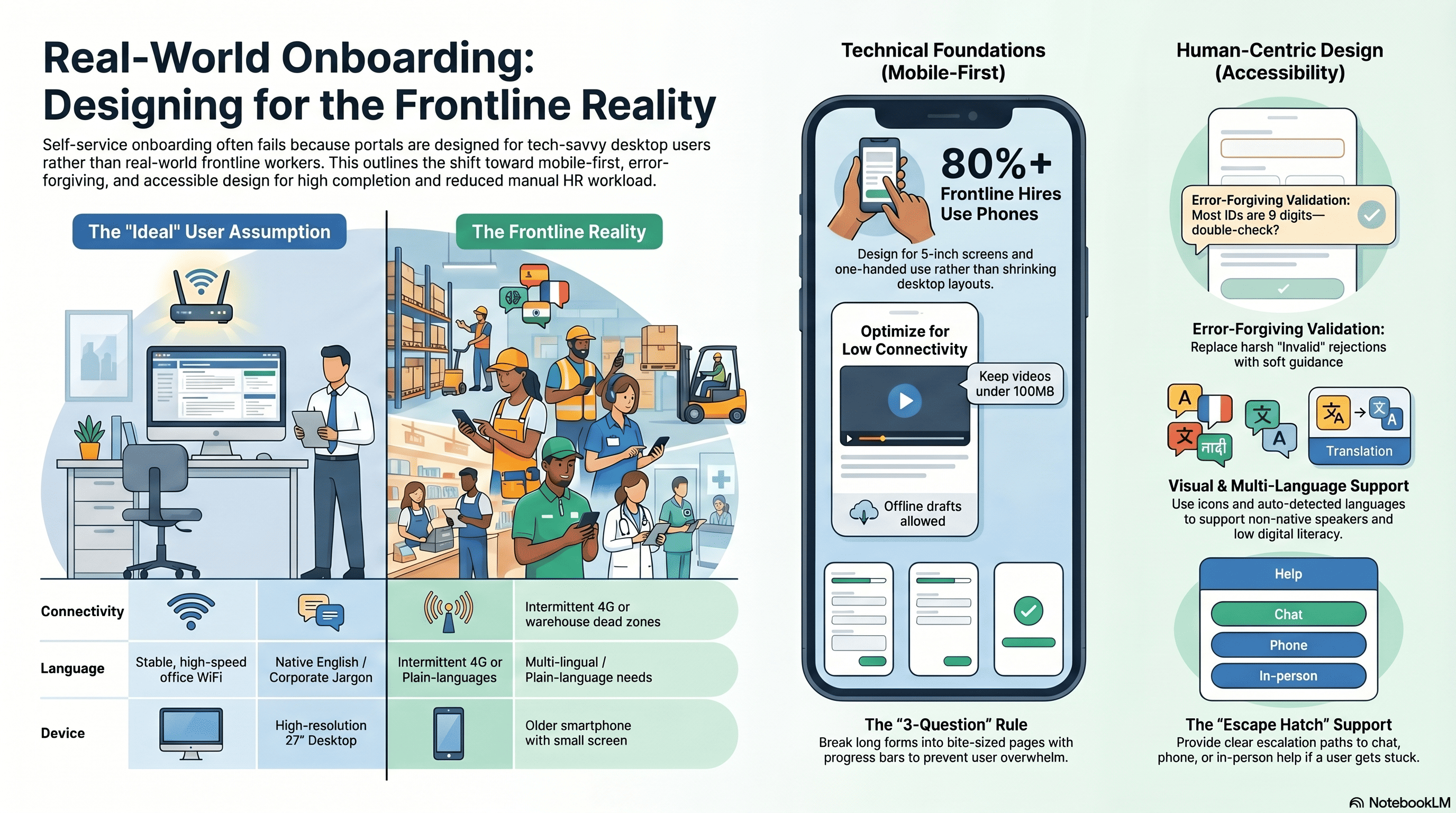
Self-service onboarding (hires completing forms, videos, documents without HR assistance) sounds efficient. But implementation often fails because HR designs for ideal users (tech-savvy, with stable internet, time to complete carefully) instead of real users (frontline workers with older phones, inconsistent WiFi, limited English, low digital literacy).
Result: Self-service portals sit abandoned. Hires complete 20% of forms, call HR for help, or just skip it. HR ends up doing manual work anyway. The supposed efficiency evaporates.
Mobile-First Design Principles
Assume Phone, Not Desktop
80%+ of frontline workers access onboarding via phone. Design for phone first. Don't design desktop, then shrink. Questions: Does the form fit a 5" screen? Can someone fill it out with one hand? Is the font readable on dim lighting (common in warehouse/retail environments)?
Optimize for Slow Connections
Not all workers have reliable WiFi. Design for 4G (slow, intermittent). Keep videos under 100MB (use compression). Allow offline form draft (save progress, resume later). Test on actual 4G networks.
Minimize Form Length
A 30-question form on a phone is overwhelming. Break it into 3-question pages. Progress bar shows what's done. Hires can stop after 3 questions and resume later without losing data.
Error-Forgiving Design
Assume form mistakes happen. Don't have harsh validation messages ("Invalid SSN"). Instead: "We noticed the SSN is 11 digits. Most are 9. Double-check?" Soft guidance instead of rejection.
Accessibility for Diverse Workforces
Many frontline workers are immigrants, non-native English speakers, or have limited formal education. Self-service must accommodate:
Multi-language support: Forms should auto-detect language (or allow selection) and present in Spanish, Chinese, Vietnamese, Arabic, etc. Not just translations—culturally appropriate guidance.
Low digital literacy: Use icons and visual guides (not just text instructions). "Upload a photo of your ID" with a visual showing exactly which ID is needed and how to position it.
Accessibility (WCAG compliance): Color-blind friendly, screen-reader compatible, keyboard-navigable. Many older workers have vision or hearing issues.
Simplified language: Avoid jargon. "Tax withholding allowances" becomes "How much do you want us to take out of your paycheck?"
Support Escalation for Self-Service
Self-service must have an escape hatch. If a hire gets stuck:
- Chat support: Real-time help for common issues ("I lost my password," "What's this field?")
- Phone support: For complex issues ("I don't have my SSN card")
- In-person option: For hires who can't complete digitally (no phone, language barrier, etc.)
Without escalation, self-service becomes a barrier. Hires give up and don't onboard.
Testing and Iteration
Before launching, test self-service with actual users (frontline workers, ideally from your demographic). Observe:
- Can they find the onboarding link/portal?
- Do they understand what each question is asking?
- Where do they get stuck?
- How long does it take?
- What technical issues arise (phone crashes, connection drops)?
Iterate based on feedback. Most organizations skip this step and launch a portal that doesn't work for their actual users.
How Cadient Talent SmartSuite Helps
SmartSuite's self-service onboarding is mobile-native (not mobile-optimized desktop). Supports 20+ languages. Accessibility features (WCAG AA compliant). Forms are error-forgiving (validation with guidance, not rejection). Chat/phone support escalation. Progress tracking (hires can resume where they left off). Integration with HRIS auto-populates with application data (reducing refilling).
References and Further Reading
- Nielsen Norman Group, 'Mobile Form Design Best Practices' (2024)
- W3C, 'WCAG 2.1 Accessibility Guidelines' (2023)
- Center for Plain Language, 'How to Write for Government Forms' (2023)
How Cadient Talent SmartSuite™ Helps
Cadient Talent’s SmartSuite™ platform automates compliance workflows, embeds regulatory guardrails directly into your hiring process, and maintains audit-ready documentation at every stage—so your team can focus on finding great talent while staying protected from costly violations.
Ready to transform your hiring?
See how Cadient Talent helps you find the right people, faster.
Learn More
