How to optimize for Google's job search engine and capture free organic recruiting traffic
Google for Jobs: The Free Channel You're Missing
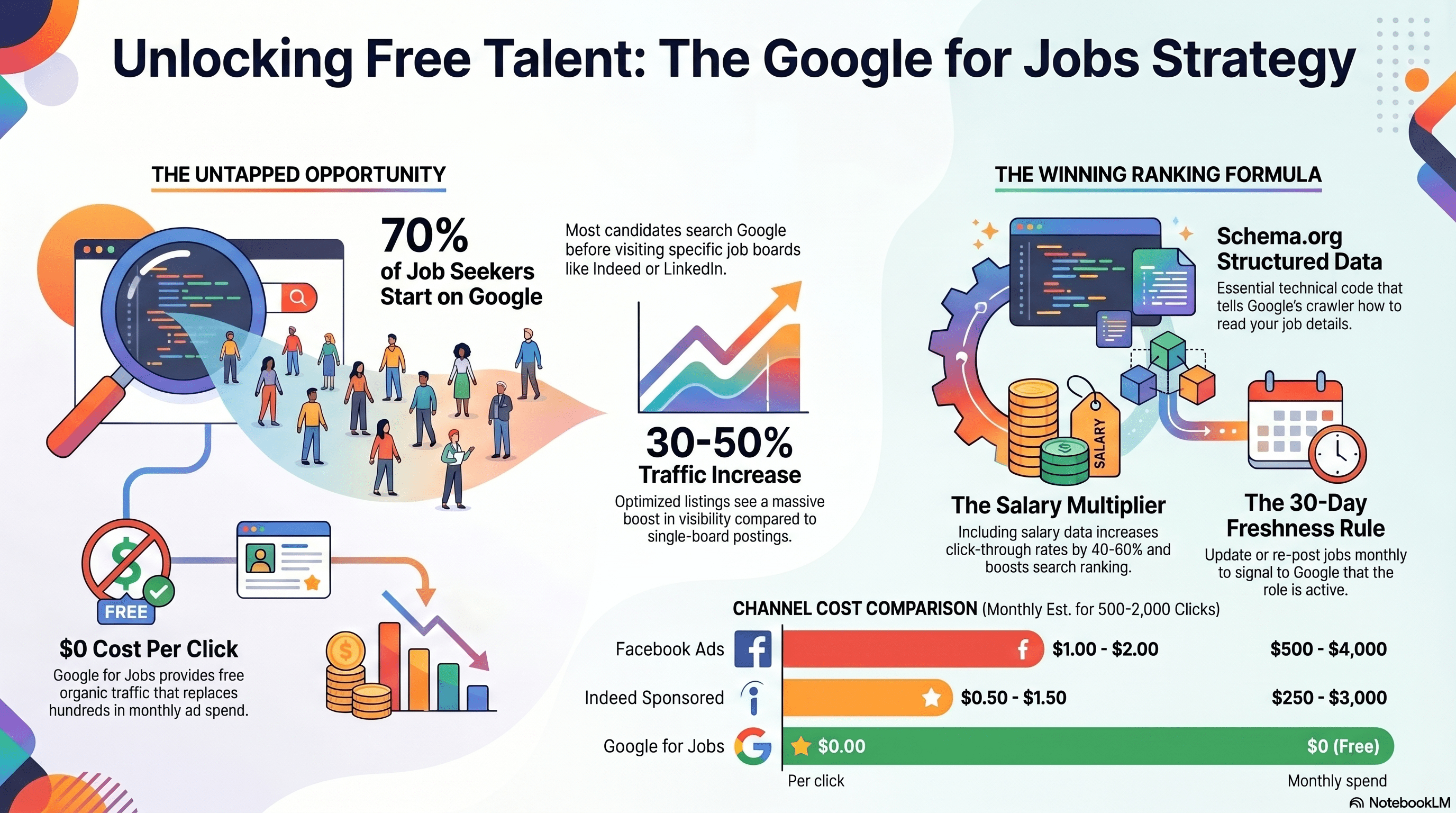
Google for Jobs launched in 2017. By 2026, it's one of the largest job search platforms in the world. It's also completely free.
Here's how it works: When someone searches 'jobs near me' or '[job title] jobs [city]' on Google, Google displays a dedicated Jobs section at the top of search results. This section pulls job postings from multiple sources—Indeed, LinkedIn, your career site, job boards, etc. Google's algorithm ranks postings based on relevance, freshness, and relevance signals.
Why this matters: Google handles 5.6 billion searches per day. Job-related searches are a significant portion (estimated 2-3% of searches = 112-168 million job searches per day). If you're not showing up in Google for Jobs, you're missing massive traffic.
Data from Google and Indeed:
- Google for Jobs displays job postings from 500,000+ sources
- 70% of job seekers use Google as their first search tool (before going to Indeed, LinkedIn, etc.)
- Jobs that appear in Google for Jobs get 30-50% more traffic than jobs only on one job board
- Cost: $0 (completely free organic traffic)
The catch: Most companies don't appear in Google for Jobs because they don't know how to optimize for it. This is your opportunity—while competitors sleep, you can capture free traffic.
How Google Scrapes and Ranks Job Postings
Google uses a crawler (like Googlebot for web pages) that scans job postings looking for structured data. Here's the process:
- Google crawls your career site and job postings
- Google looks for structured data markup (schema.org JobPosting)
- If found, Google extracts: job title, company, location, salary, job description, application URL, posting date, expiration date
- Google ranks the posting based on:
- Relevance to search query (keyword match)
- Freshness (recently posted or updated)
- Completeness (has all required fields)
- Salary transparency (postings with salary rank higher)
- Mobile-friendliness (mobile-optimized postings rank higher)
- Matching the searcher's location (jobs near searcher rank higher)
- Google displays the posting in Google for Jobs search results
Key insight: Google doesn't charge you to rank. You don't bid for placement like Google Ads. You earn your position by having complete, fresh, optimized job postings.
Ranking factors (in order of importance):
- Keyword match: "Retail Associate" matches search "retail jobs"
- Location match: Job is in searcher's location (or nearby)
- Salary: Postings with salary rank higher than those without
- Freshness: Recently posted or updated postings rank higher than stale ones
- Completeness: All schema.org fields filled = higher rank
- Mobile-friendliness: Mobile-optimized posting = higher rank
- Company credibility: Postings from established companies (brand recognition) rank slightly higher
You can't game these factors. You can't pay for better ranking. But you can optimize within each factor, and that compounds to significant ranking improvement.
Schema.org JobPosting: The Technical Foundation
For Google to scrape your job postings, they need structured data markup. Specifically, schema.org JobPosting format.
What is schema.org?
Schema.org is a standard for structured data that tells search engines what information means. For jobs, the JobPosting schema tells Google: "This is a job posting. The job title is X, company is Y, location is Z," etc.
Example JobPosting schema (simplified):
```json
{
"@context": "https://schema.org/",
"@type": "JobPosting",
"title": "Retail Associate",
"description": "Full-time retail associate position. Helps customers, stocks shelves, operates register.",
"identifier": {
"@type": "PropertyValue",
"name": "Company Name",
"value": "JOB123"
},
"datePosted": "2026-04-01T00:00:00.000Z",
"validThrough": "2026-05-01T00:00:00.000Z",
"hiringOrganization": {
"@type": "Organization",
"name": "Your Company",
"sameAs": "https://www.yourcompany.com"
},
"jobLocation": {
"@type": "Place",
"address": {
"@type": "PostalAddress",
"streetAddress": "123 Main Street",
"addressLocality": "Denver",
"addressRegion": "CO",
"postalCode": "80202",
"addressCountry": "US"
}
},
"baseSalary": {
"@type": "PriceSpecification",
"priceCurrency": "USD",
"price": "20",
"priceValidUntil": "2026-05-01T00:00:00.000Z"
},
"employmentType": "FULL_TIME",
"url": "https://www.yourcompany.com/jobs/retail-associate-denver"
}
```
Required fields (must include for Google to recognize):
- title: Job title
- description: Job description
- hiringOrganization: Company name
- jobLocation: Where the job is (street address, city, state, zip)
- datePosted: When posted (ISO 8601 format)
- validThrough: When posting expires (ISO 8601 format)
- url: Link to apply
Highly recommended fields:
- baseSalary: Wage or salary (hourly or annual)
- employmentType: FULL_TIME, PART_TIME, TEMPORARY, CONTRACTOR
- applicantLocationRequirements: Remote, on-site, or hybrid
Optional fields:
- benefits: Health insurance, 401k, etc.
- jobLocationType: TELECOMMUTE, TEMPORARY_LOCATION, etc.
- experienceRequirements: e.g., "1 year retail experience"
How to implement:
Option 1 (easiest): Use an ATS or career site builder that auto-generates schema.org markup. Most modern ATS systems (Workable, Lever, SmartSuite) do this automatically. You post a job, schema markup is generated automatically.
Option 2 (manual): Write schema.org markup manually in JSON-LD format and add to your career site HTML. Google provides documentation.
Option 3 (hybrid): Use a WordPress plugin (if your career site is WordPress) that generates markup automatically.
Verification: After you've added markup, use Google's Rich Results Test (search.google.com/test/rich-results) to validate that Google can read your markup correctly.
Once markup is in place, Google's crawler can index your jobs and include them in Google for Jobs results.
Free Organic Traffic: How Jobs Appear in Google Search
Once you've added schema.org markup to your career site jobs, Google crawls them and includes them in two places:
- Google for Jobs: Dedicated job search results (search 'jobs near me' or '[role] jobs [city]')
- Regular Google Search: Regular search results for relevant queries
Example:
You post a job: "Shift Lead, $22/hr, Denver"
Your site has schema.org JobPosting markup
Google crawls and indexes it
When candidate searches:
- "shift lead jobs denver": Your posting appears in Google for Jobs section + regular search results
- "warehouse lead denver": Your posting might appear (keyword relevance varies)
- "jobs near denver": Your posting appears in local job results
All of this is organic (free). You don't pay Google. You don't bid on keywords. You just have a well-optimized posting that ranks based on relevance and quality signals.
Traffic volume from Google for Jobs:
- Depends on job market in your location and industry
- For high-demand roles (retail associate, driver, warehouse worker): 20-100 clicks per job per month
- For niche roles: 5-20 clicks per job per month
- For 100 open jobs, you might get 500-2,000 free clicks per month from Google
Comparison to paid channels:
- Indeed sponsored: $0.50-1.50 per click = $250-3,000/month for 500-2,000 clicks
- Facebook ads: $1.00-2.00 per click = $500-4,000/month for 500-2,000 clicks
- Google for Jobs: $0 per click = $0/month for 500-2,000 clicks
Google for Jobs is literally free traffic that's already available. You're just not capturing it.
Salary Data and Direct Apply: The Ranking Multipliers
Two factors dramatically improve your Google for Jobs ranking and traffic:
Factor 1: Salary transparency
Jobs with salary information rank higher in Google for Jobs than jobs without. This is both an algorithmic ranking factor and a user behavior factor.
Algorithmically: Google's algorithm explicitly favors postings with salary data. Jobs with salary get higher placement in Google for Jobs results.
Behaviorally: Candidates see salary in the search results (if present) and are more likely to click. More clicks = higher engagement signal = higher ranking.
Data:
- Jobs with salary in Google for Jobs results: 40-60% higher click-through rate
- Impact on ranking: ~10-15% boost in position
Implementation: When posting jobs, always include salary/wage in your schema.org markup and in the job description.
Factor 2: Direct apply button
Google for Jobs displays a green "Apply" button if your posting has a direct apply URL. This button goes directly to your application (not a redirect to Indeed or another board).
Importance:
- Direct apply button is more trustworthy to candidates (going directly to company)
- Direct apply button improves click-through rate
- Direct apply button reduces friction (no redirects)
If your job posting in Google for Jobs points back to Indeed or a third-party board, candidates have to click through a redirect. This adds friction and reduces conversion.
Implementation: Make sure your `url` field in schema.org JobPosting points to your own career site application, not a job board. This requires hosting your jobs on your own career site or using an ATS that provides direct apply links.
Best practice setup:
- Post job on your career site (or ATS)
- Career site generates schema.org JobPosting with direct apply URL
- Also post to Indeed, LinkedIn, etc. (optional, for additional reach)
- Google crawls your career site, indexes in Google for Jobs with direct apply button
- Candidates see your job in Google for Jobs, click apply, go directly to your site
Result: Direct apply from Google for Jobs has 10-20% better conversion than redirects.
Freshness and Updates: Keep Your Postings Current
Google's algorithm heavily weights freshness. A job posting that was updated today ranks higher than one that hasn't been touched in 2 months.
Why? Because outdated postings might be filled already or no longer active. Google wants to show candidates fresh, active jobs.
How to keep postings fresh:
Option 1: Regular posting updates
Even if the job details haven't changed, re-post or update the job monthly. This updates the `datePosted` field and signals to Google that the posting is still active.
Steps:
- Set a calendar reminder: "Re-post [job title] jobs" (monthly)
- Go to your career site
- Edit each job posting (change nothing)
- Save/update
- Schema.org datePosted field updates to today
- Google re-crawls and re-ranks (usually within 24 hours)
Option 2: Automatic re-posting
Some ATS systems have auto-repost settings: "If a job doesn't get 30 applications in 30 days, automatically re-post it." This keeps jobs fresh without manual intervention.
Option 3: Bulk updates
Make minor updates to job descriptions (rewording, formatting, minor content changes) and save. This updates the posting while keeping content essentially the same.
Optimal refresh rate:
- Active hiring (getting applications regularly): Update every 2 weeks
- Continuous hiring (permanent open role): Update every 4 weeks
- Hard-to-fill roles: Update weekly
Expiration dates:
Set your `validThrough` field to 30-90 days in the future. If a job is filled or closed, update this field to today. This prevents Google from showing expired/filled jobs in search results.
Impact of freshness:
- Stale jobs (not updated in 3+ months): Poor ranking, fewer impressions
- Regularly updated jobs: High ranking, more impressions
- Estimated impact: 30-50% more impressions from keeping jobs fresh
Direct Apply vs. Redirect: The Traffic Architecture
This deserves deeper explanation because it dramatically affects your Google for Jobs strategy.
Scenario A: Direct Apply (Best)
- Candidate searches "retail jobs denver" on Google
- Sees your job in Google for Jobs results
- Clicks "Apply"
- Goes directly to your career site application form
- Fills out form, applies
- You capture the application in your ATS
Advantages:
- Direct apply button in Google (more trustworthy, higher CTR)
- No redirect friction
- Application data goes straight to your ATS
- You own the candidate data
- Better user experience
Requirements:
- Your career site must host job postings
- Your career site must have application functionality
- Your ATS must be integrated with career site
- Schema.org JobPosting URL must point to your site
Scenario B: Redirect to Job Board (Common but Suboptimal)
- Candidate searches on Google
- Sees your job in Google for Jobs (scraped from Indeed or LinkedIn)
- Clicks "Apply"
- Redirected to Indeed/LinkedIn
- Fills out Indeed application
- Application goes to Indeed, not your ATS
- You manually move data to your ATS
Disadvantages:
- No direct apply button from Google (shows "Visit Indeed" instead)
- Candidate friction (redirect, new login if needed)
- Application data lives on Indeed, not your ATS
- You lose candidate data ownership
- Worse user experience
Why companies do this: They don't have their own career site. They only post to Indeed/LinkedIn. Google scrapes those postings and includes them in results.
Better architecture: Post to both your career site AND Indeed/LinkedIn. Google prioritizes direct apply (your site) but will show Indeed if your site isn't available.
Ideal setup:
- Host job on your career site (schema.org markup, direct apply)
- Optionally, also post to Indeed and LinkedIn (for additional reach)
- Google indexes your career site as primary
- Candidates can apply directly from Google
- Referral from Indeed also works (your career site is also on Indeed)
Result: You get Google for Jobs traffic (free) + Indeed traffic (paid) + LinkedIn traffic (paid). Multiple channels, same job.
Career Site Setup: The Foundation for Google for Jobs Success
To successfully use Google for Jobs, you need a career site (or ATS) that can host jobs with schema.org markup.
Options:
Option 1: Dedicated ATS with career site
Platforms like Workable, Lever, SmartSuite, Recruitee, Bamboo include a career site builder and auto-generate schema.org markup.
Cost: $200-500/month depending on features and job volume
Setup time: 1-2 weeks
Technical skill required: Low (drag-and-drop career site builder)
Capabilities: Built-in schema markup, job posting management, application tracking
Best for: Companies serious about recruiting, want integrated solution
Option 2: Career site builder (standalone)
Platforms like Greenhouse, iCIMS, or Jobvite are ATS-focused with career site included.
Cost: $300-1,000+/month
Setup time: 2-4 weeks
Technical skill required: Medium
Capabilities: Advanced customization, integration with many systems
Best for: Enterprise companies, complex requirements
Option 3: Website builder + ATS integration
Use a general website builder (Webflow, Wix, WordPress) to create career site, integrate with ATS via API.
Cost: $50-300/month for website + $100-300/month for ATS
Setup time: 3-6 weeks
Technical skill required: High (requires developer)
Capabilities: Full customization of career site design
Best for: Companies with technical resources, want full control of design
Option 4: WordPress plugin
Use WordPress for your main site, install job posting plugin (e.g., WP Job Manager) that auto-generates schema.org markup.
Cost: $0-50/month plugin + WordPress hosting
Setup time: 1-2 weeks
Technical skill required: Medium (WordPress familiarity)
Capabilities: Basic job posting and application
Best for: Small companies, already using WordPress
My recommendation: For most companies, Option 1 (ATS with built-in career site) is best. It's affordable, includes application tracking, auto-generates schema markup, and is easy to set up.
Analytics and Tracking: Measuring Google for Jobs Traffic
To optimize Google for Jobs, you need to measure where traffic comes from and how it converts.
Setup tracking:
- UTM parameters on career site links
When you post jobs, add UTM parameters to your apply link:
`?utm_source=google_for_jobs&utm_medium=organic&utm_campaign=[job_title]`
This tells your analytics and ATS that traffic came from Google for Jobs.
- ATS source tracking
Most ATS systems track "source of application" (where the candidate came from). Make sure you're tracking this:
- source: Google for Jobs
- source: Indeed
- source: LinkedIn
- source: Facebook
- source: Career Site Direct
- source: Referral
- Google Search Console
Add your site to Google Search Console (free tool). Google shows you:
- How many impressions your jobs get in Google for Jobs
- How many clicks your jobs get
- Average position (ranking) of your jobs
- Which keywords drive traffic
This data is invaluable for optimization.
What to measure:
Monthly:
- Impressions from Google for Jobs (Google Search Console)
- Clicks from Google for Jobs (Google Search Console)
- Applications from Google for Jobs source (ATS data)
- Cost per application: $0 (it's free)
- Conversion rate: Applications from Google / Clicks from Google
Example dashboard:
| Metric |
Target |
Actual |
Status |
| Google for Jobs impressions |
5,000+ |
3,200 |
Low |
| Google for Jobs clicks |
200+ |
85 |
Low |
| Google for Jobs applications |
50+ |
28 |
Low |
| CTR (clicks/impressions) |
5% |
2.7% |
Low |
| Apply rate (apps/clicks) |
30% |
33% |
Good |
Conclusion from this data: You're getting low impressions. This means either:
- Your jobs aren't ranking in Google for Jobs (schema markup issue or low relevance)
- Your jobs don't have keywords candidates are searching for
- Your jobs don't show salary (ranking penalty)
Next actions:
- Verify schema.org markup is correct (use Rich Results Test)
- Check if salary is included (add if not)
- Check if jobs are fresh (update if >4 weeks old)
- Check keyword fit (are you using keywords candidates search for?)
Optimization Checklist: Get Your Jobs in Google for Jobs
Here's the complete checklist to ensure your jobs show up in Google for Jobs and rank well:
Prerequisites:
- Have a career site (or ATS with career site) to host job postings
- Career site has schema.org JobPosting markup on job pages
- Verify markup is correct using Google's Rich Results Test
Per Job Posting:
- Job title is clear and uses common keywords (e.g., "Retail Associate" not "Sales Associate Specialist")
- Job description is complete and well-written (refer to Article 11)
- Salary/wage is included (required for best ranking)
- Location is specific (full street address, city, state, zip)
- Employment type is specified (FULL_TIME, PART_TIME, etc.)
- Apply link goes directly to your career site (not a redirect)
- Job is mobile-optimized
- Valid expiration date is set (30-90 days in future)
Schema.org Markup Fields:
- title: Present and accurate
- description: Present, detailed, well-written
- hiringOrganization: Company name present
- jobLocation: Full address present
- datePosted: Current date (ISO 8601 format)
- validThrough: 30-90 days in future (ISO 8601 format)
- url: Direct apply link on your site
- baseSalary: Wage/salary included
- employmentType: Specified
Ongoing Maintenance:
- Update jobs monthly (refresh datePosted to boost freshness)
- Monitor Google Search Console for impressions/clicks
- Track Google for Jobs traffic in your ATS
- Update job descriptions if content changes
- Refresh salary ranges quarterly if market rates change
- Close/expire jobs when filled (update validThrough date)
Optional Optimizations:
- Add benefits to schema.org markup
- Add applicantLocationRequirements (remote, on-site, hybrid)
- Add experienceRequirements
- A/B test job titles and descriptions
- Ensure career site is fast on mobile (<3 second load)
- Use Google Analytics to track career site traffic by source
Completing this checklist ensures your jobs appear in Google for Jobs and rank as high as possible.
Google for Jobs ROI: Quick Math
Let's calculate the ROI of optimizing for Google for Jobs:
Scenario: Retail company with 30 open positions
Current state (before optimization):
- Posted on Indeed paid ($1,000/month for sponsored listings)
- Google for Jobs traffic: minimal (jobs not optimized)
- Total monthly recruiting cost: $1,000
After optimization:
- Setup career site with schema.org markup: $200/month (ATS cost)
- Posted on Indeed (optional, can reduce or remove paid spend): $500/month
- Google for Jobs traffic: 150 applications/month (estimated from 30 jobs, 5 apps per job)
- Total monthly recruiting cost: $700
Calculation:
- Monthly savings: $1,000 - $700 = $300
- Annual savings: $300 × 12 = $3,600
- But you're getting MORE applications (150 from Google + 200 from Indeed paid = 350 total vs. previous 200)
- With 20-to-1 funnel, 350 applications = 17.5 hires/month
- With 200 applications (previous): 10 hires/month
- Incremental hires: 7.5/month = 90/year
What's the value of those 90 extra hires?
- Cost to train new hire: ~$1,000
- Cost to replace a turned-over hire: ~$5,000
- Annual hiring cost for 90 people: $90,000 (direct cost)
- Reduced cost by improving pipeline efficiency: $3,600
- Better candidates, lower turnover = further savings (harder to quantify, but likely $10,000+)
ROI: For $200/month ATS cost ($2,400/year), you're capturing $3,600 in direct savings + $10,000+ in retention/quality improvements = 4-5x ROI.
This doesn't even account for the long-term compounding benefit of having optimized jobs that rank in Google for Jobs perpetually (you pay once, get traffic for years).
For high-volume hiring companies, Google for Jobs is literally free money if you optimize for it.
Implementation Timeline: 30-Day Quick Start
Get your jobs in Google for Jobs in 30 days:
Week 1: Setup
- Choose ATS/career site platform (Workable, Lever, SmartSuite, etc.)
- Sign up and set up account (1-2 days)
- Set up basic career site (job template, styling, apply form)
- Verify schema.org markup is auto-generated (check Rich Results Test)
Week 2: Migrate Jobs
- Take your top 10 open positions
- Post them on your new career site
- Include full job details, salary, direct apply link
- Verify each job's schema.org markup in Google Rich Results Test
- Test applying on desktop and mobile
Week 3: Index and Monitor
- Submit your career site to Google Search Console (if not already)
- Add site URL to Google Search Console
- Submit sitemap to Google (most ATS systems auto-generate sitemap)
- Check Google Search Console for "Status" to see if jobs are indexed
- May take 3-7 days for Google to crawl and index
Week 4: Optimize and Scale
- Check Google Search Console for impressions/clicks (may be small, but tracking starts here)
- Optimize top jobs: Add salary if missing, improve descriptions, refresh dates
- Post remaining open positions to career site
- Monitor Search Console daily for first week
- Set up tracking in ATS: Label source as "Google for Jobs"
Post-Launch (Ongoing)
- Monthly: Refresh job postings (update datePosted)
- Monthly: Check Google Search Console for performance
- Quarterly: Analyze which keywords drive traffic, optimize job titles/descriptions
- Quarterly: Update salary ranges if market rates change
Expected outcomes:
- Week 4: First impressions in Google for Jobs (if jobs are indexed)
- Month 2: 10-50 clicks/month from Google for Jobs (depending on role/location/market)
- Month 3-4: 30-100 applications/month from Google for Jobs
- 6+ months: Google for Jobs becomes a reliable, predictable sourcing channel
Once established, Google for Jobs is essentially free traffic that continues indefinitely. You're not paying Google. You're not renting access. You've built an asset (optimized career site with schema markup) that generates traffic perpetually.
That's why Google for Jobs is the recruiting channel most companies are ignoring: because the payoff isn't immediate (takes 2-4 months to build), but the ROI is massive once it's working.
References and Further Reading
- Google for Jobs Official Documentation. (2023). 'Job Posting Schema and Best Practices.' Developer documentation on schema.org JobPosting implementation.
- Google Search Central. (2023). 'Rich Results Test Guide.' Tool and documentation for validating schema markup.
- Google Search Central. (2023). 'Search Console Help: Structured Data.' Guidance on using Search Console to monitor job posting indexing.
- Search Engine Journal. (2023). 'Google for Jobs: Complete Guide.' Comprehensive guide to optimizing for Google for Jobs.
- Indeed Hiring Lab. (2023). 'Job Posting Optimization and Google Indexing.' Data on how job postings perform in organic search.
- Moz Research. (2023). 'Schema Markup for Jobs: Impact on Visibility.' Analysis of schema implementation and ranking.
- Bureau of Labor Statistics. (2023). 'Online Job Search Behavior.' Data on where candidates search for jobs.
How Cadient Talent SmartSuite™ Helps
Cadient Talent’s SmartSuite™ platform automates compliance workflows, embeds regulatory guardrails directly into your hiring process, and maintains audit-ready documentation at every stage—so your team can focus on finding great talent while staying protected from costly violations.
