Why mobile-first recruiting is non-negotiable and how to optimize every touchpoint
The Mobile-First Candidate Reality
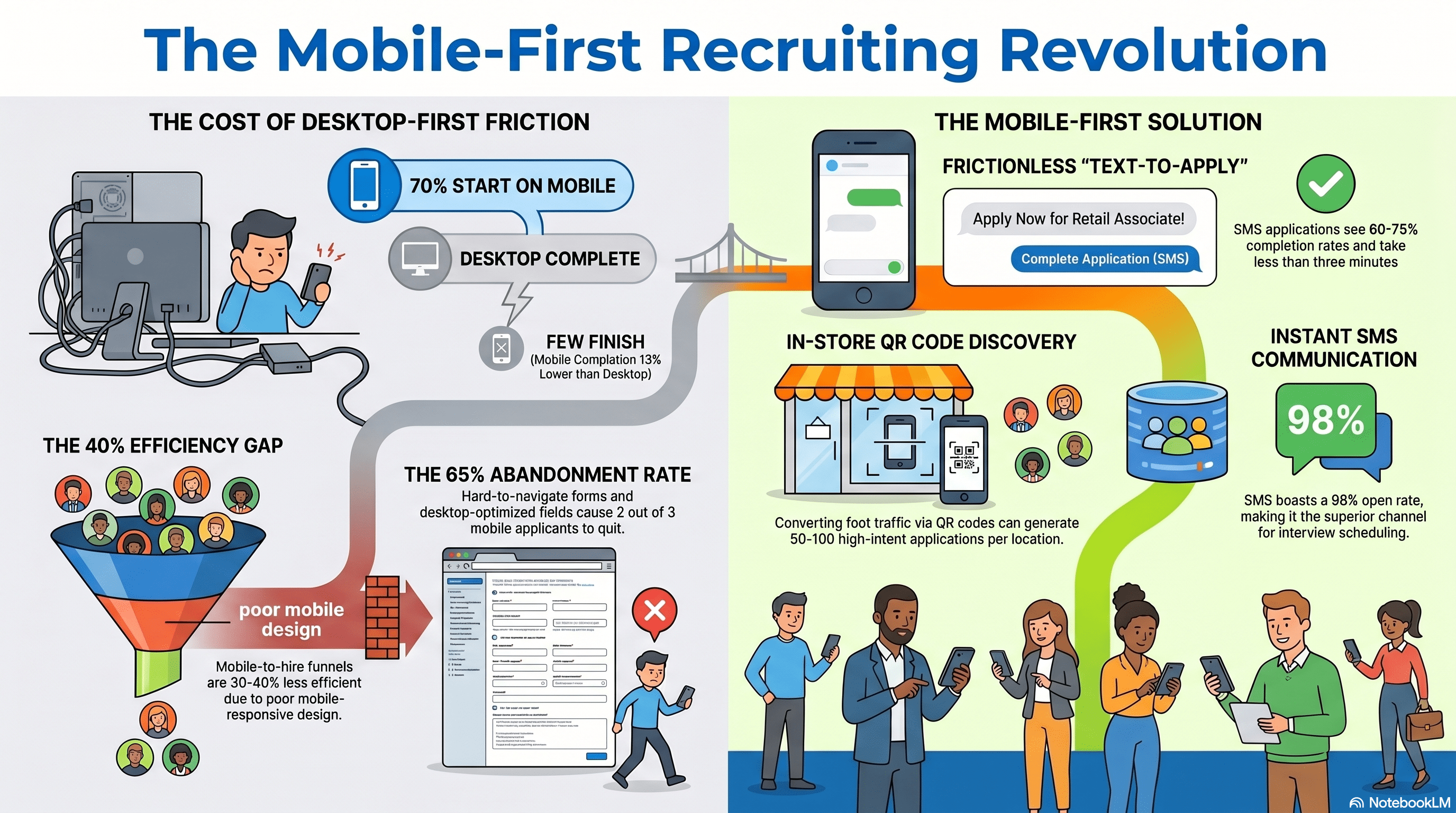
Two-thirds of job applications in 2026 are started on mobile. One-third are completed on mobile. Candidates are searching for jobs, reviewing companies, and applying—all on their phones.
Yet most recruiting infrastructure was built for desktop. Career sites that don't render properly on mobile. Job descriptions that are walls of text on small screens. Application forms with tiny buttons and desktop-optimized fields. Video interviews that require desktop interaction.
This disconnect costs companies tens of thousands in lost applications.
Data from Glassdoor and Indeed:
- 70% of job applications begin on mobile
- 65% of job applications in hospitality/retail start on mobile
- 35% of mobile applications are completed on mobile (vs. 48% desktop)
- Mobile-to-hire funnel is 30-40% less efficient than desktop funnel
Why? Because the mobile experience is worse. Slower, harder to navigate, incomplete.
But here's the opportunity: Most competitors haven't optimized for mobile either. By building a genuinely mobile-first recruiting experience, you immediately get a competitive advantage. You'll see more applications, better completion rates, faster hiring.
Let's talk about every touchpoint of the mobile candidate journey.
Mobile Job Discovery: Search, Browse, Apply
The mobile job seeker starts by searching.
Typical flow:
- Candidate opens Google, types 'jobs near me' or 'retail jobs [city]'
- Google shows Indeed, LinkedIn, Facebook Jobs, and your career site (if optimized)
- Candidate clicks one (likely Indeed or Google for Jobs)
- Scrolls through job listings on phone
- Clicks a job that looks interesting
- Reads job description on phone
- Clicks 'Apply'
Optimization at each step:
Step 1: Search visibility
Make sure your jobs appear when candidates search on Google and mobile job platforms. This requires:
- Posting to Indeed, LinkedIn, Facebook Jobs (these get indexed)
- Implementing schema.org JobPosting markup on your career site (Google for Jobs scrapes this)
- Using keyword-rich job titles and descriptions (candidates search for keywords, optimize for those)
Step 2: Job listing click-through rate
When a candidate sees your job in a search result, will they click?
- Title matters: 'Retail Associate, $20/hr, Full-Time, Flexible Schedule' gets more clicks than 'Sales Associate'
- Salary visibility: Post pay in the job listing preview (many candidates skip postings without pay)
- Location clarity: Show exact location or distance ('2.3 miles away' is better than generic city)
- Meta description (if you're showing up in Google search): First 160 characters visible on mobile. Make them compelling.
Step 3: Job description readability on mobile
Candidate is reading your job description on a 5-inch phone screen.
- Is it readable? Short paragraphs, bullets, lots of white space?
- Can they find key info (pay, schedule, location) without scrolling 5 screens?
- Is the 'Apply' button visible above the fold (no scrolling to find it)?
If the answer to any of these is 'no,' candidates bounce to another job posting.
Step 4: Apply button and form
As discussed in Article 12, the application process is where 60% abandon. On mobile, that number is 65%.
- Is the Apply button big enough to tap (44x44px minimum)?
- Does the form load fast?
- Is the form optimized for mobile (as discussed)?
- Does one-click apply work (if the job board supports it)?
Mobile-First Career Site: The Foundation
Your career site is the hub. Job boards drive traffic to it, but your career site is where the experience either succeeds or fails.
Mobile-first career site requirements:
- Fast load time: On mobile 4G, your site should load in under 3 seconds. (Test at webpagetest.com or Google PageSpeed Insights.) Slower = candidates bounce.
- Responsive design: Site automatically adapts to phone screen size. Test on iPhone, Android. Does it look good on both?
- Easy job search: Can candidates find jobs in 2-3 taps?
- Search by job title (not buried)
- Filter by location (candidate's location first, "near me" option)
- Filter by type (full-time, part-time, flexible)
- No unnecessary filters that just add complexity
- Job listing that converts: Each job listing should show:
- Title
- Location (distance if possible, e.g., "1.5 miles")
- Key benefits on listing preview: "$20/hr | Full-Time | Flexible Schedule"
- "Apply Now" button (prominent, large, contrasting color)
- Read more (expands to full job description)
- Full job description that engages: As discussed in Article 11, job descriptions should be marketing copy, scannable, mobile-formatted.
- Social proof on career site: Show why people want to work there
- Glassdoor rating and link
- Employee testimonials ("I love my team here" - real employees, with photo if possible)
- Photos of actual team/store/warehouse (not stock photos)
- Recent hires or success stories
- Easy application: One-click apply (if tech supports) or streamlined form (as discussed in Article 12).
- Confirmation: After applying, candidate sees "You're all set! We'll review your application and reach out within [timeframe]." This reduces anxiety and sets expectations.
- Mobile-specific features:
- "Nearby jobs" (use geolocation to show jobs within X miles)
- Text the job link to friend (virality)
- SMS notifications ("Your application was received." "Next step: Phone screen scheduled for 3/15.")
- Save job to apply later (bookmarking)
A mobile-first career site is not a mobile version of your desktop site. It's a site designed for phone first, then adapted to desktop.
SMS-Based Applications: Text-to-Apply
Texting is ubiquitous. Every candidate has SMS. Why not let them apply via text?
How it works:
- Job posting includes: "Text 'APPLY' to [number] to apply now" (or scan QR code)
- Candidate texts APPLY
- System sends back a series of SMS prompts: "What's your name?", "What's your email?", etc.
- Candidate replies to each
- Application is submitted via SMS
Benefits:
- 98% SMS open rate (vs. 40% email)
- Fastest interaction (candidate doesn't leave text app)
- Zero friction (no clicking links, no loading pages)
- Accessible (works on any phone)
Data from businesses using SMS-based applications:
- SMS application completion rate: 60-75% (vs. 40% web form)
- Time to apply: 2-3 minutes
- Higher applicant quality (candidates who go through friction are serious)
Challenges:
- Requires two-way SMS capability (most job board integrations don't have this natively)
- Need SMS number and service (Twilio, MessageBird, or built into ATS)
- Limited fields (SMS is best for name, email, phone, basic yes/no questions)
- Follow-up screening still needs to happen via phone/email
Who's using this:
- Domino's Pizza: "Text 'DELIVER' to [number] to apply"
- McDonald's: In-store signage with text-to-apply
- Amazon Logistics: Text-to-apply for delivery driver roles
For hourly hiring, SMS-to-apply is incredibly effective because it removes friction and appeals to the way candidates actually communicate (texting).
QR Codes on In-Store Signage: Frictionless Discovery
For retail and hospitality companies with physical locations, in-store signage with QR codes is a powerful recruitment channel.
How it works:
- In-store poster: "We're hiring! Scan to apply"
- QR code links to: Mobile-optimized job application (or SMS text-to-apply)
- Customer or passerby scans QR code
- Gets taken directly to job application
- Can apply right there on their phone
Why this works:
- You're reaching people who are already at your location (highest intent)
- You're meeting them where they are (phone in hand, customer mindset, willing to take small action)
- Barrier to apply is just one scan (no typing URL, no searching)
- The signage is also employer branding ("We're hiring!" signals growth)
Data from retailers using in-store QR codes:
- 15-30% of store traffic scans the code
- Of those who scan: 40-50% click through to apply
- Of those: 50-60% complete the application
- Overall conversion: 3-9% of store traffic applies
Implementation:
- Create job posting(s) for your locations
- Generate QR code that links to mobile application (use QR code generator like QR Stuff, link to your career site)
- Print in-store posters (laminate for durability)
- Place in high-traffic areas: break room, near register, in hiring areas, near entrance
- Update QR code periodically or use dynamic QR codes (change link without reprinting)
- Track: Use UTM parameters on the link to track "source: in-store QR" in your ATS
Cost: $0-100 (printing and potential QR code service)
ROI: For a 50-person retail location, if 5% of annual foot traffic applies via QR code, that's 5,000 applications (assuming 500k annual foot traffic). Even at 30-to-1 funnel ratio, that's 166 hires per location per year—not realistic but shows the potential.
More realistically: 50-100 applications per location per year from QR codes. At 20-to-1 funnel, that's 2.5-5 hires per location per year. For a 50-location retailer, that's 125-250 hires from in-store QR codes alone. Massive.
Mobile Interview Scheduling and Communications
Once a candidate applies, your mobile interactions continue through scheduling and communication.
Optimal mobile interview workflow:
- Instant SMS confirmation: "Thanks for applying to [position] at [location]! We'll review your application and reach out within 24 hours."
- Sets expectations
- Signals that application was received
- 98% read rate on SMS
- SMS notification when advanced to next stage: "Great news! We'd like to schedule a phone interview with you. Click here to choose a time: [link]"
- Link goes to mobile-friendly scheduling tool (Calendly, HubSpot, or ATS-native)
- Candidate picks time from available slots
- Automatic confirmation SMS sent
- Mobile-friendly interview scheduling:
- Link opens in browser (or calendar app)
- Shows available times in candidate's local timezone
- Large buttons for selecting time
- One-click confirmation
- Confirmation SMS/email sent
- Pre-interview communication:
- 24-hour reminder SMS: "Your phone interview with [name] is tomorrow at [time]. Call [number] when ready."
- Day-of reminder: "Your interview is in 1 hour. Any questions? Reply to this text."
- Post-interview next steps:
- SMS after interview: "Thanks for talking with us! We'll let you know next steps within 2 business days."
- If advancing: SMS with next interview time
- If not advancing: SMS with "Thanks for your time. We've moved forward with other candidates. Keep an eye on our site for future opportunities."
Key principle: SMS is your mobile communication channel, not email. Email on mobile is slow, cluttered, easy to ignore. SMS is immediate, clear, hard to ignore.
Implementation: Most modern ATS platforms (Workable, SmartSuite, Lever) support SMS workflows. Set them up.
Impact: Candidates feel valued (fast response), process moves faster (scheduling is instant), no-show rate drops (reminders increase attendance).
Mobile Video Interviews: The Emerging Standard
One-way video interviews (candidate records a response to interview questions) are increasingly common. On mobile, they work surprisingly well.
How it works:
- Candidate receives SMS: "Complete a quick video interview to move forward. Record your responses to 3 questions. Takes 10 minutes. Link: [URL]"
- Candidate opens link on mobile
- Questions display: "Tell us about yourself." "Why do you want this job?" "Describe a time you helped a customer."
- Candidate hits record, answers each question
- Responses are video-recorded and sent to your ATS
- Hiring manager watches videos asynchronously
Benefits:
- Mobile native (recorded on phone, candidate doesn't need desktop)
- Asynchronous (candidate can do at 11pm if needed, hiring manager watches when convenient)
- Rich signal (manager sees personality, communication, confidence—hard to fake)
- Scales (can be sent to 100 candidates, each records and sends)
Challenges:
- Requires mobile internet (4G or WiFi)
- Some candidates uncomfortable on camera
- Requires hiring manager to review (adds time)
- Not ideal for initial screening (too heavy)
When to use:
- After phone screening (not as first interview)
- For roles where communication/personality is critical (customer-facing roles especially)
- When you have multiple candidates and want to narrow down before in-person interviews
Platforms supporting one-way video on mobile:
- HireVue (one-way video interviews)
- Willo (one-way video interviews)
- Most modern ATS platforms (Workable, Lever, SmartSuite)
For hourly hiring, one-way video can actually be more efficient than phone screens if candidates are comfortable recording. It gives you better visibility into communication and personality than a phone call.
Mobile-First Metrics: What to Track
To optimize mobile recruiting, measure it separately from desktop.
Metrics to track:
- Device breakdown: What percentage of your applications start on mobile vs. desktop?
- If 70%+ are mobile, your entire strategy should be mobile-first
- If only 40% are mobile, desktop optimization might be higher priority
- Completion rate by device:
- Mobile completion rate (should improve, goal 55%+)
- Desktop completion rate (should be 50%+)
- Gap between them (should be <5 percentage points)
- Application source by device:
- Which mobile platforms drive the most traffic? (Indeed mobile, Google for Jobs mobile, Facebook mobile, QR codes, SMS)
- Which convert best?
- Time to completion by device:
- Mobile: goal <5 minutes
- Desktop: goal <5 minutes
- If mobile is >7 minutes, form is too long for mobile
- Mobile SMS engagement:
- SMS open rate (should be 95%+)
- SMS click-through rate (should be 30-50%)
- SMS reply rate (if using SMS-to-apply)
- Interview scheduling completion:
- Percentage of candidates who complete scheduling (should be 80%+)
- Time from interview offer to scheduling completion (should be <4 hours)
- No-show rate by channel:
- Candidates scheduled via SMS reminders should have lower no-show rate
- Track: mobile SMS-scheduled vs. email-scheduled vs. phone-scheduled
Example dashboard:
| Metric |
Target |
Actual |
Status |
| Mobile traffic % |
65% |
68% |
Good |
| Mobile completion rate |
55% |
48% |
Needs Work |
| SMS open rate |
95% |
97% |
Great |
| Interview scheduling rate |
80% |
75% |
Needs Work |
| No-show rate (SMS vs email) |
SMS 5%, Email 12% |
SMS 6%, Email 14% |
Tracking |
Allocate optimization effort to the metrics that are underperforming.
The Mobile-First Recruiting Roadmap: 90 Days to Mobile Dominance
Implementation roadmap to go mobile-first:
Month 1: Audit and Plan
- Measure current mobile vs. desktop breakdown (what % of applications start on mobile?)
- Test your career site on mobile (iPhone and Android). How does it look? Is it responsive?
- Check job posting readability on mobile. Can someone read the job description without excessive scrolling?
- Check application form on mobile. How long does it take? Where do people abandon?
- Identify top 3 mobile optimization opportunities
Month 1-2: Quick Wins
- Add progress bar to application form
- Reduce required fields from [X] to 5 or fewer
- Implement SMS confirmation: "Thanks for applying. We'll review and reach out within 24 hours."
- Add in-store QR codes to 3 pilot locations (if retail)
- Test mobile resume parsing (auto-extract name, email from uploaded resume)
- Enable one-click apply on Indeed/LinkedIn (if not already enabled)
Month 2-3: Bigger Optimization
- Redesign career site for mobile-first (responsive, fast loading, easy search)
- Implement SMS-based scheduling: SMS notification when candidate advances, link to mobile scheduling tool
- Set up SMS pre-interview reminders (24 hours before, 1 hour before)
- Create mobile-optimized job descriptions (short paragraphs, bullets, readability score Grade 8-9)
- Roll out in-store QR codes to all locations
- A/B test SMS confirmation vs. email confirmation (SMS should win)
Month 3: Measure and Iterate
- Measure impact: Mobile completion rate improved from 40% to 55%? Yes? Scale it.
- Measure SMS engagement: 98% open rate? Yes? Shift communication from email to SMS.
- Measure QR code applications: Getting 50+ per location per month? Yes? Expand and improve signage.
- Identify next optimization area (video interviews, SMS-to-apply, etc.)
- Set 90-day goal: "70% of applications complete on mobile, 55% completion rate, SMS open rate 95%+"
Expected outcome: By Month 3, your mobile recruiting is fundamentally different. Faster, smoother, higher conversion. Candidates have a better experience. You get more applications. Hiring accelerates.
The Competitive Advantage of Mobile-First Recruiting
By 2027-2028, mobile-first recruiting will be table stakes. Every serious recruiter will have optimized for it.
But right now, in 2026, most companies haven't. They're still desktop-first. They're still sending email when SMS would convert better. They're still pushing candidates to desktop-based applications when mobile would be faster.
The companies that build mobile-first recruiting now will have:
- 30-50% higher application completion rate on mobile
- 20-30% faster mobile hiring (fewer steps, faster scheduling, better communication)
- Lower cost-per-hire overall (more efficient mobile funnel)
- Better candidate experience (mobile-optimized feels good)
- Stronger employer brand ("they make applying so easy")
This compounds. Better mobile experience → more applications → higher quality pipeline → faster hiring → lower cost → more budget for recruiting → more channels → more applications.
Start your mobile audit this week. Measure your current mobile experience. Identify one optimization (progress bar, SMS confirmation, QR codes, one-click apply). Implement it. Measure impact. Iterate.
Your 2027 recruiting will thank you.
References and Further Reading
- Glassdoor Economic Research. (2023). 'Mobile vs. Desktop Job Application Behavior.' Analysis of device-specific application rates.
- Indeed Hiring Lab. (2023). 'Mobile Job Search Trends.' Data on where candidates search for jobs.
- Google Insights. (2023). 'Mobile-First Indexing and Job Search.' Google's recommendations for job posting optimization.
- HubSpot Research. (2023). 'Mobile Page Speed and Conversion.' Data on load time impact on form completion.
- Twilio Insights. (2023). 'SMS Open and Click Rates.' Data on SMS effectiveness vs. email.
- Nielsen Norman Group. (2022). 'Mobile Usability and Job Application Design.' UX research on mobile form optimization.
- Bureau of Labor Statistics. (2023). 'Job Seeker Device Usage and Search Behavior.' Labor market data on mobile job searching.
How Cadient Talent SmartSuite™ Helps
Cadient Talent’s SmartSuite™ platform automates compliance workflows, embeds regulatory guardrails directly into your hiring process, and maintains audit-ready documentation at every stage—so your team can focus on finding great talent while staying protected from costly violations.
